In this second part of the Euler equations practical session, we move from standard test cases to more complex and realistic scenarios. You will implement the double Mach reflection problem, a classical benchmark that tests the ability of numerical schemes to capture complex shock interactions.
You must complete the part 1 before starting this part.
Adding a new case
We now want to implement a new test case: the double Mach reflection problem. This problem involves a Mach 10 shock wave reflecting off a solid wall at a 60-degree angle, creating complex shock interactions and flow features. The following figure illustrates the problem setup:
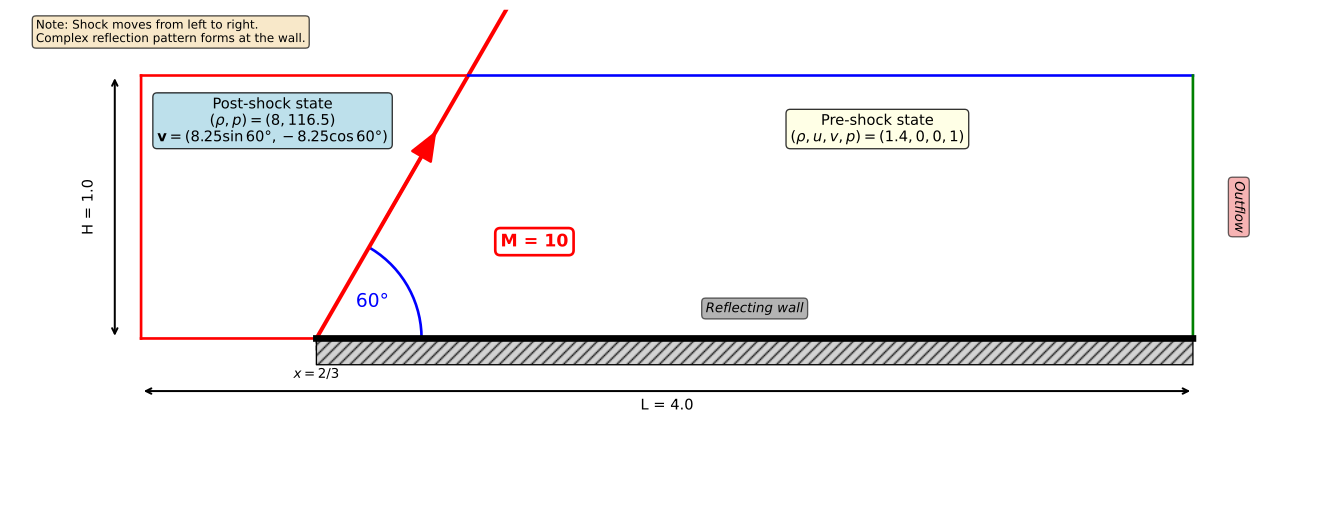
This problem was introduced by Woodward and Colella (1984) as a challenging test case for high-resolution shock-capturing schemes.
Initial shock geometry
The initial condition for the double Mach reflection problem divides the domain into two regions separated by the initial shock line. The shock starts at position and extends at a 60-degree angle.
The shock line is defined by the equation:
Left of the shock line (post-shock region): Apply the post-shock state with:
Right of the shock line (pre-shock region): Apply the pre-shock state with:
Boundary conditions
The default boundary conditions implemented in samurai are not sufficient for this case, so you will need to create custom boundary condition classes. samurai provides Dirichlet, Neumann, and periodic boundary conditions, but for this exercise, you will implement a new boundary condition that imposes specific values on the ghost cells.
Let’s use the implementation of the Dirichlet boundary condition in samurai as an example to create your own custom boundary condition.
template <class Field>
struct Dirichlet : public samurai::Bc<Field>
{
    INIT_BC(Dirichlet, 2)

    apply_function_t get_apply_function(constant_stencil_size_t, const direction_t&) const override
    {
        return [](Field& u, const stencil_cells_t& cells, const value_t& dirichlet_value)
        {
            //      [0]   [1]
            //    |_____|.....|
            //     cell  ghost

            u[cells[1]] = 2 * dirichlet_value - u[cells[0]];
        };
    }
};You now have all the ingredients to implement the double Mach reflection problem. Using samurai, you can select the boundary cells for each side of the domain as follows:
const xt::xtensor_fixed<int, xt::xshape<dim>> bottom = {0, -1}; // Define the direction of the bottom boundary

// If you want to impose a value on all the bottom boundary cells
samurai::make_bc<Imposed>(u, rho, rhoE, momx, momy)
    ->on(bottom);

// If you want to impose a value depending on the position of the cell
samurai::make_bc<Imposed>(u,
                        [&](const auto& direction, const auto& cell_in, const auto& coord)
                        {
                            // Return an xt::xtensor_fixed<double, xt::xshape<dim + 2>> representing the value to impose (rho, rhoE, momx, momy)
})->on(bottom);The double Mach reflection problem requires careful implementation of boundary conditions on each side of the domain. Let’s analyze what needs to be done for each boundary:
Bottom boundary (y = 0):
For : The reflective wall is in contact with the post-shock state. Apply the post-shock state (left_state) on the ghost cells.
For : This is a reflective wall. The density and energy should remain the same as in the interior cell, while the normal velocity component (v) should be reversed. You can achieve this by setting:
xt::xtensor_fixed<double, xt::xshape<dim + 2>>{
    u[cell][EulerConsVar::rho],
    u[cell][EulerConsVar::rhoE],
    u[cell][EulerConsVar::mom(0)],
    -u[cell][EulerConsVar::mom(1)]  // Note the minus sign for v-momentum
}
Top boundary (y = 1): The shock wave moves with time. At time , the shock position along the top boundary is:
For : The shock has passed; apply the post-shock state (left_state).
For : The shock hasn’t arrived yet; apply the pre-shock state (right_state).
Left boundary (x = 0): This is an inflow boundary where the post-shock state enters the domain. Apply the post-shock state (left_state) on all ghost cells.
Right boundary (x = 4): This is an outflow boundary. Use Neumann boundary conditions (zero gradient):
samurai::make_bc<samurai::Neumann<1>>(u, 0, 0, 0, 0)->on(right);Adaptation issue
To illustrate this point, we will use a 1D case implemented in the solution directory under the name main_1d.cpp. This example is a double rarefaction problem. We’ll discuss an issue that may arise during the adaptive mesh refinement process. In the case of Euler equations, when using adaptive mesh refinement, maintaining physical validity (i.e., positive density and pressure) can be challenging. If you’re not expecting it, it can be confusing. To illustrate this, we’ll drive the adaptation using a field other than the conservative variables. This is the first time in this practical session that we discuss this possibility. It’s easy to do with samurai. Here’s how:
auto MRadaptation = samurai::make_MRAdapt(other_field);

MRadaptation(mra_config, conserved_variables);
In this example, the mesh adaptation is driven by other_field, but the conservative variables are also updated accordingly during the adaptation process. You can add as many fields as you want to the adaptation step. Be sure to put mra_config as the first argument of the adaptation function.
You may encounter issues where the density or the pressure fields become negative in some regions due to how the multi-resolution algorithm works. The detail computation used for adaptation is based on wavelets, where we compute mean values over cells. This can lead to non-physical negative values for density or pressure during the refinement process when using the prediction operator provided by samurai. This phenomenon is only visible when the stencil size of the prediction operator is greater than or equal to 1 (the default is 1). If you use a prediction of order 0, you should not encounter this issue because you simply copy the value of the parent cell into the newly created child cells.
To avoid this issue, you can provide your own prediction operator that ensures positivity of density and pressure during the prediction step. The idea is to compute the new field values in the newly created child cells using the default prediction operator and then check if the density and pressure are positive. If not, you simply copy the field values from the parent cell into the child cells.
The prediction operator can be added during the creation of the multi-resolution object as follows:
auto MRadaptation = samurai::make_MRAdapt(prediction_fn, u);where prediction_fn is a function with the following definition:
template <std::size_t dim, class TInterval>
class Euler_prediction_op : public samurai::field_operator_base<dim, TInterval>
{
  public:

    INIT_OPERATOR(Euler_prediction_op)

    inline void operator()(samurai::Dim<dim>, auto& dest, const auto& src) const
    {

    }
};

auto prediction_fn = [&](auto& new_field, const auto& old_field)
{
    return samurai::make_field_operator_function<Euler_prediction_op>(new_field, old_field);
};Step 3: Prepare for child cell inspection
Create the indices for the child cells. Remember that when you refine a cell, each parent cell is divided into 4 children in 2D:
auto i_f     = i << 1;      // Double the index in x-direction
i_f.step     = 2;           // Set step to 2
auto index_f = index << 1;  // Double the index in y-direction
Step 4: Check for negative density
For each of the 4 children, check if the density is negative. In 2D, the children are indexed by (0,0), (1,0), (0,1), (1,1):
const auto mask_rho =
    (dest(EulerConsVar::rho, level + 1, i_f + 0, index_f + 0) < 0.0) ||
    (dest(EulerConsVar::rho, level + 1, i_f + 1, index_f + 0) < 0.0) ||
    (dest(EulerConsVar::rho, level + 1, i_f + 0, index_f + 1) < 0.0) ||
    (dest(EulerConsVar::rho, level + 1, i_f + 1, index_f + 1) < 0.0);
Step 5: Compute pressure for each child
For each child cell, compute the pressure from the conservative variables. Remember that:
(internal energy from total energy)
(equation of state)
Create an array to store the 4 pressure values and compute them:
std::array<xt::xtensor<double, 1>, 4> pressure;
for (auto& p : pressure)
{
    p = xt::empty<double>({i.size()});
}

// For child (0,0)
auto rho_00 = dest(EulerConsVar::rho, level + 1, i_f + 0, index_f + 0);
auto e_00 = dest(EulerConsVar::rhoE, level + 1, i_f + 0, index_f + 0) / rho_00;
auto u_00 = dest(EulerConsVar::mom(0), level + 1, i_f + 0, index_f + 0) / rho_00;
auto v_00 = dest(EulerConsVar::mom(1), level + 1, i_f + 0, index_f + 0) / rho_00;
e_00 -= 0.5 * (u_00 * u_00 + v_00 * v_00);
pressure[0] = EOS::stiffened_gas::p(rho_00, e_00);

// Repeat for the other 3 children: (1,0), (0,1), (1,1)
// ...
Step 6: Check for negative pressure
const auto mask_p = (pressure[0] < 0.0) || (pressure[1] < 0.0) ||
                    (pressure[2] < 0.0) || (pressure[3] < 0.0);
Step 7: Apply prediction of order 0 on problematic cells
For cells where either density or pressure is negative, copy the parent cell value to all children:
samurai::apply_on_masked(mask_rho || mask_p,
                         [&](auto& ie)
                         {
                             // Copy parent to child (0,0)
                             xt::view(dest(level + 1, i_f + 0, index_f + 0), ie) =
                                 xt::view(src(level, i, index), ie);

                             // Copy parent to child (1,0)
                             xt::view(dest(level + 1, i_f + 1, index_f + 0), ie) =
                                 xt::view(src(level, i, index), ie);

                             // Copy parent to child (0,1)
                             xt::view(dest(level + 1, i_f + 0, index_f + 1), ie) =
                                 xt::view(src(level, i, index), ie);

                             // Copy parent to child (1,1)
                             xt::view(dest(level + 1, i_f + 1, index_f + 1), ie) =
                                 xt::view(src(level, i, index), ie);
                         });
This ensures that physical quantities remain positive during the mesh refinement process.
```{exercise}
Run the 1D simulation using adaptive mesh refinement with your custom prediction operator. Verify that the simulation runs without issues related to negative density or pressure values.
```